




The Blog
How to Check Your Amazon KDP Books for Plagiarism... and FIX it
Protect Your KDP Account From Strikes With This Accurate, Affordable Plagiarism Detection Solution
Are you creating books for Amazon KDP? Then you absolutely need to know how to check for plagiarism, especially if you're creating those books with the help of AI. One plagiarism strike from Amazon can jeopardize your entire KDP account, and recovering from that is incredibly difficult (or even impossible).
When I started publishing books and creating them with AI assistance, I was completely overwhelmed. There are so many plagiarism checking tools out there, and most of them are either inaccurate, expensive, or have such low word limits that they're useless for checking full-length books.
I tested countless plagiarism checkers, and they all said different things. Most claimed there was no plagiarism. Others flagged false positives. I was frustrated until I discovered QuillBot - and I'm not kidding when I say it changed everything for me. This was my first high content book created with the help of AI, so I took it very seriously. I almost didn't publish it out of fear, but thanks to QuillBot, I took the leap and published it at last.
Why KDP Authors Must Check for Plagiarism
Amazon takes plagiarism and copyright infringement extremely seriously. According to Amazon's content guidelines, you're responsible for verifying that all content adheres to intellectual property rights, whether it's AI-generated, AI-assisted, or human-written. And you can commit plagiarism accidentally, even when you didn't copy anything nor use AI.
If Amazon flags your book for plagiarism, you face:
Immediate removal of your book from the platform
Potential termination of your entire KDP account
Loss of all royalties and income from your catalog
Difficulty getting your account reinstated
Damage to your author reputation
The stakes are incredibly high, which is why checking for plagiarism before publishing isn't optional - it's essential protection for your business.
The QuillBot Plagiarism Checker: Why This Tool Stands Above the Rest
After testing numerous plagiarism checkers, QuillBot emerged as the clear winner for KDP authors. Here's why it's the plagiarism detection tool I trust and use for every book I publish:
1. Large Text Analysis Capacity
Most plagiarism checkers have frustratingly low limits - maybe 1,000 or 3,000 words at a time. That's useless when your KDP book is 10,000, 30,000, or even 60,000 words. One of my books is 60,000 words, and I was desperate to find a checker that could handle large volumes of text.
QuillBot allows you to analyze up to 25,000 words per month with their premium plan, and you can purchase additional words if needed. This capacity makes it practical for checking entire books, or chapter by chapter if they're very large, without constantly hitting limits.
2. Exceptional Accuracy
QuillBot uses advanced algorithms to detect plagiarism with remarkable precision. According to independent testing, it demonstrates detection rates of 91.2% for human-written text and 99.7% for content sourced from the internet - significantly higher than many competitors.
The tool doesn't just flag potential issues; it shows you exactly where plagiarism appears, cites the sources where similar content exists, and highlights the specific phrases that match existing material online.
3. Affordable Pricing
At just $99 per year for the premium plan (that's only $8.25 per month), QuillBot offers exceptional value. Many other plagiarism checkers charge double or triple that amount for less functionality and lower word limits.
The premium plan includes unlimited paraphrasing, the plagiarism checker, grammar checking, AI detection, and numerous other features that benefit authors.
4. Superior Spelling & Grammar Check for Authors
I've used Grammarly extensively, and while it's popular, I find QuillBot's grammar and spelling checking significantly better for book writing. QuillBot catches errors that Grammarly misses and provides natural-sounding and more contextually appropriate suggestions for long-form content.
Step-by-Step: How to Check Your KDP Book for Plagiarism
Let me walk you through exactly how I use QuillBot to check my books before publishing on Amazon KDP.
Step 1: Access QuillBot's Plagiarism Checker
Navigate to QuillBot and create your account. Then log in to your account. You'll need the premium plan to access the plagiarism checker - it's not available in the free version.
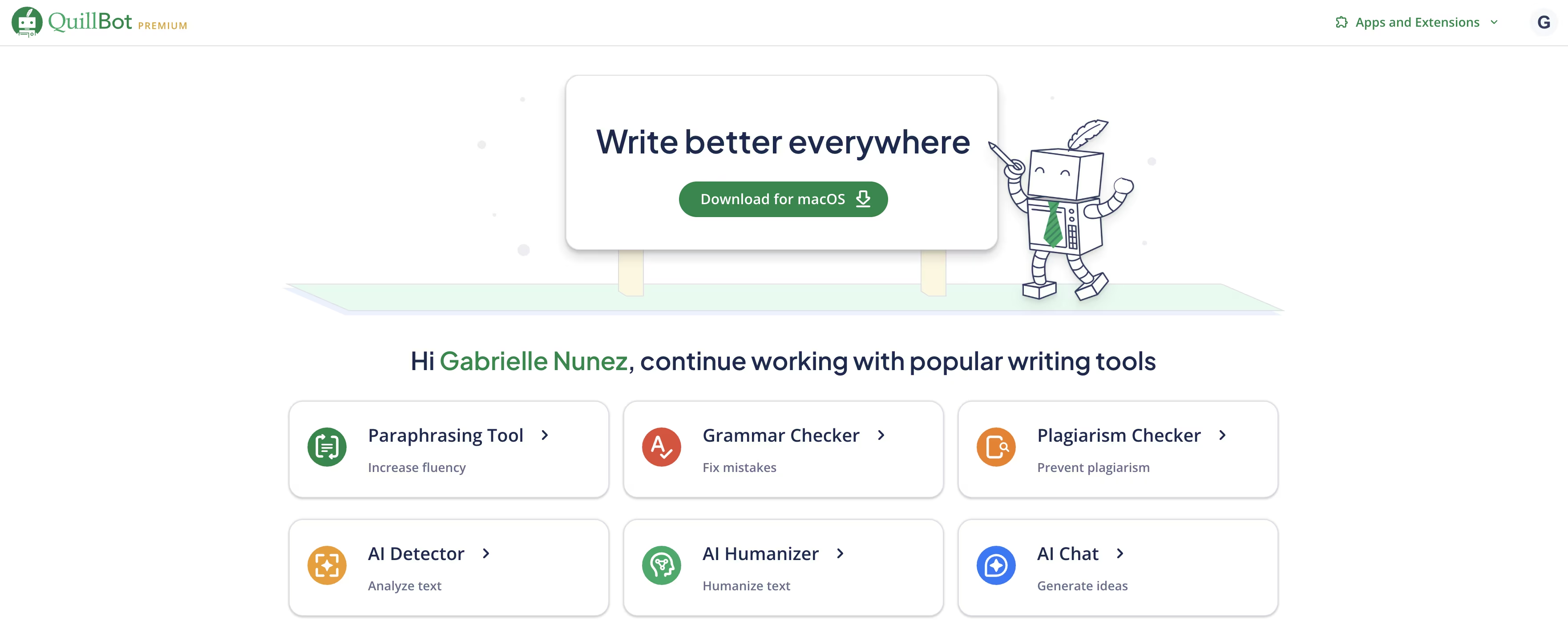
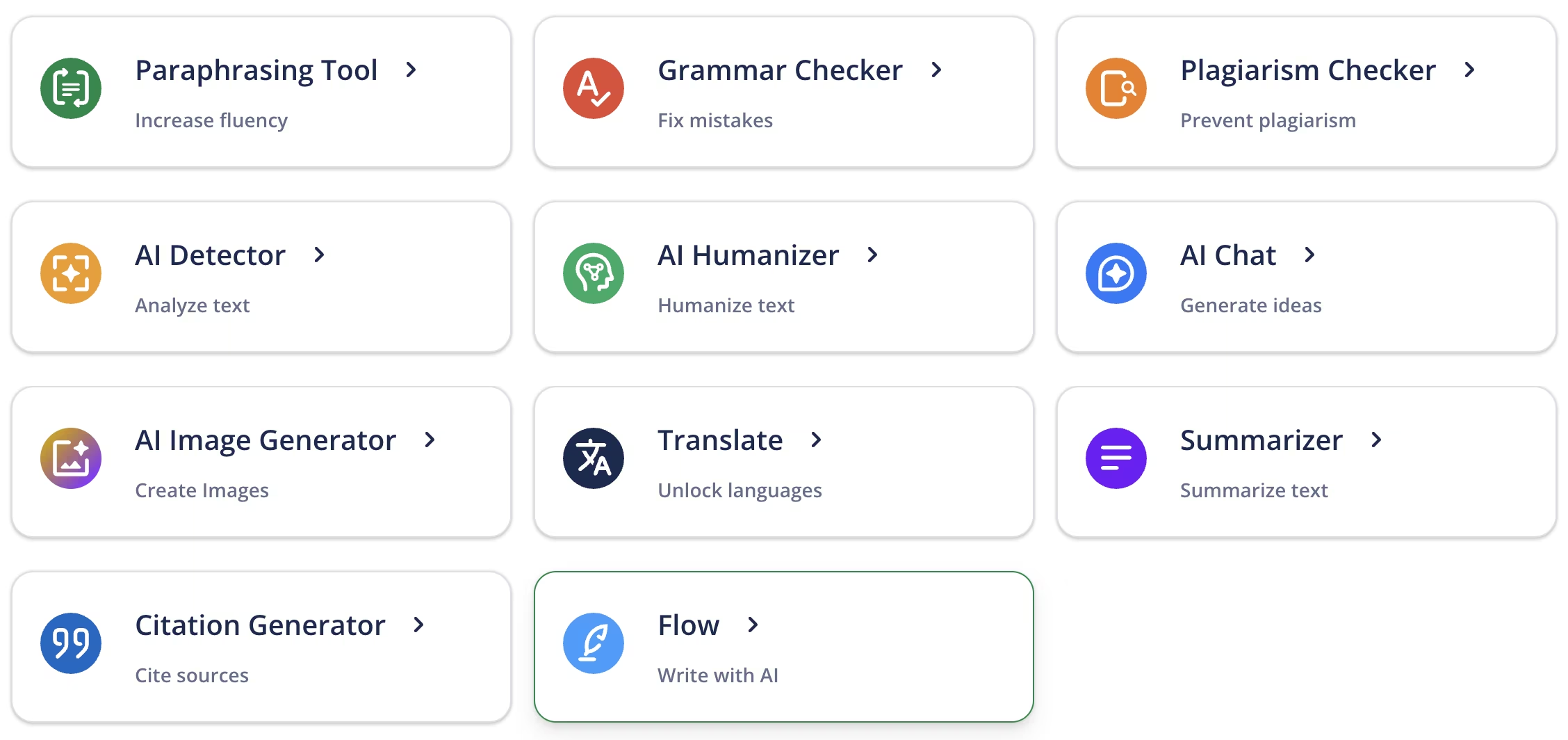
On the dashboard, you'll see various tool options including the Paraphraser, Grammar Checker, AI Detector, Plagiarism Checker, and more. Click on "Plagiarism Checker."
Step 2: Prepare Your Text
Before scanning, you need to decide how to divide your book if it is larger than 25,000 words.
I recommend checking for plagiarism chapter by chapter, especially if your chapters are substantial (5,000+ words each). This approach helps you:
Stay within word limits efficiently
Identify problematic sections more easily
Make targeted corrections without re-scanning the entire manuscript
If your chapters are shorter (1,000-4,000 words), you can combine several chapters in one scan to maximize your word usage.
Step 3: Upload or Paste Your Text
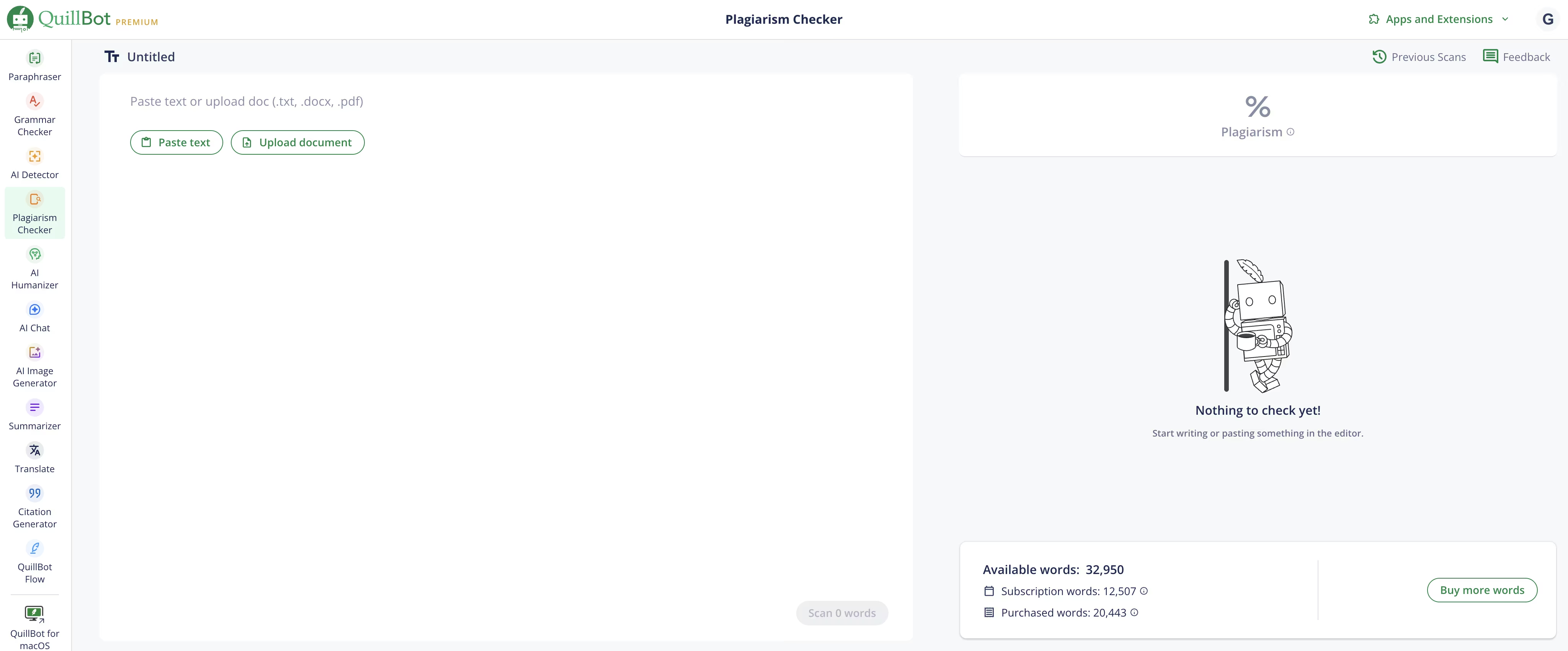
You have two options for adding text to QuillBot:
Copy and paste directly from your manuscript
Upload a document if you prefer working with files and your manuscript is less than 25,000 words
For my 60,000-word book, I selected each chapter entirely, copied it, and pasted it into QuillBot's plagiarism checker.
Step 4: Run the Scan
Click the "Scan" button. QuillBot will analyze your text, which typically takes a couple of minutes depending on the length. The tool compares your content against millions of web pages, academic papers, and published materials to detect similarities.
You can see your remaining word count displayed clearly. I currently have about 45,000 words available in my premium plan, with some leftover from previous scans. You can purchase additional words anytime without changing your subscription level by clicking the button "Buy more words."

Step 5: Review the Results & Evaluate What Needs Changing
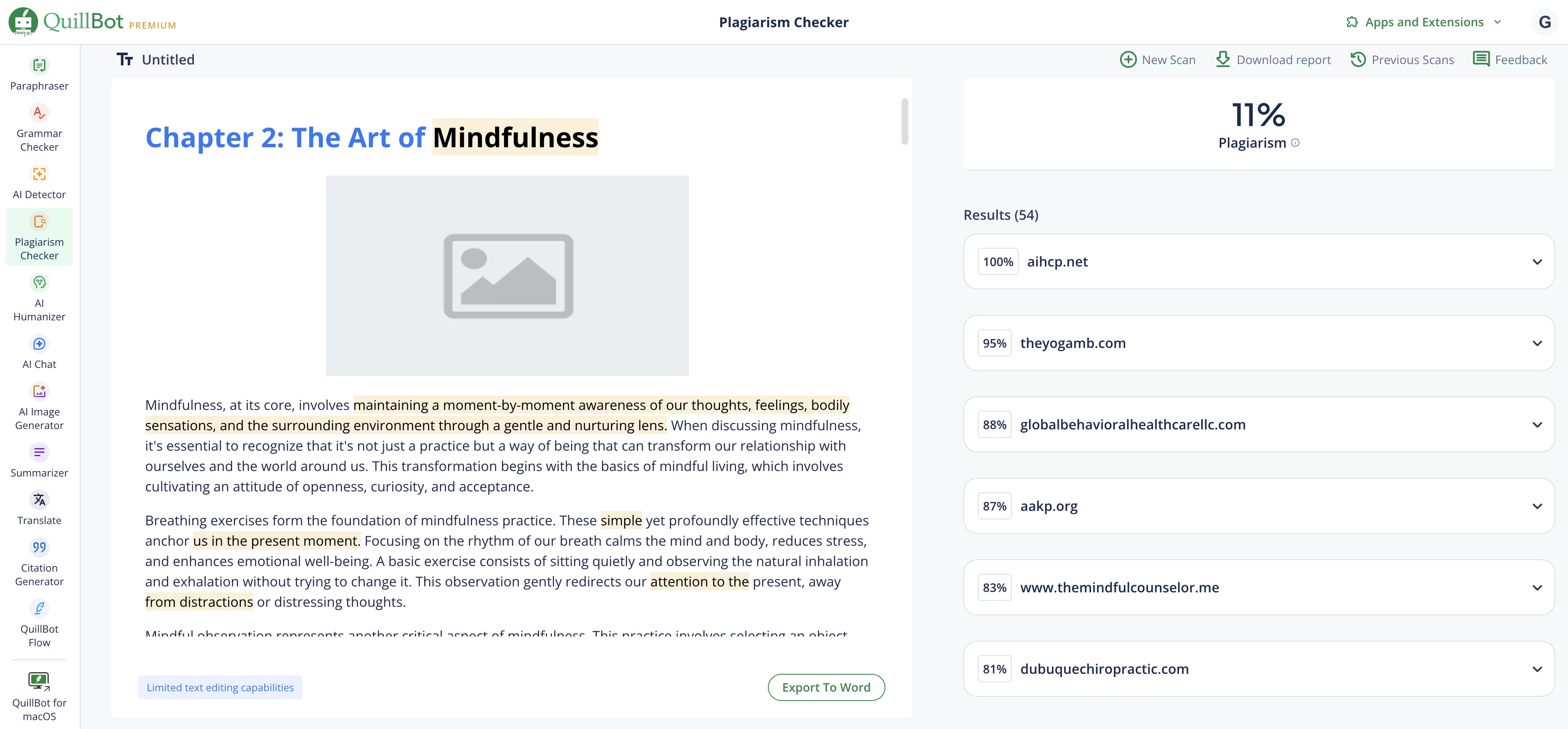
When the scan completes, QuillBot provides a detailed plagiarism report showing:
Overall Plagiarism Percentage: For example, my Chapter 2 scan showed 11% plagiarism. While not terrible, this isn't great either and requires attention.
Source Citations: It identifies exactly where it found matching content, providing links to the original sources so you can verify the similarities.
Highlighted Text: The tool highlights specific phrases and sentences where plagiarism was detected, making it easy to see what needs to be changed.
Not all flagged text requires modification. Here's how to determine what to fix:
Short Matches (1-4 words): Common phrases like "consider how someone else" or "view the situation" are typically fine. You can't claim plagiarism on universally used short phrases.
Longer Phrases (5+ words): These definitely need attention. When it highlights entire sentences or multiple consecutive words, you must rephrase to avoid the risk of Amazon flagging your content.
Cluster Concerns: Even if individual highlighted sections are short, if you see many highlights clustered together in a single paragraph, that's problematic. The cumulative similarity is too high.
Step 6: Rephrase Problematic Content to Fix Possible Plagiarism
For sections that need revision, I use this simple workflow:
1. Select the flagged text that shows significant similarity.
2. Copy it to your clipboard.
3. Open an AI writing assistant like ChatGPT or Claude AI (I personally prefer Claude for writing tasks),
or use QuillBot's Paraphrasing tool.
4. Prompt the AI: "Please rephrase this:" and paste the problematic paragraph.
5. Review the rephrased version to ensure it maintains your intended meaning and sounds natural.
6. Paste the new version back into your manuscript in QuillBot, replacing the flagged text.
This process ensures your content is original while preserving the information and ideas you want to convey.
Step 7: Re-Scan if Necessary
After making substantial changes, you can run another scan to verify that your revisions eliminated the plagiarism issues. Keep in mind that smaller text samples will show higher plagiarism percentages naturally due to statistical limitations.
For the most accurate results, scan at least 3-5 chapters together (if they total 5,000+ words). This provides a better overall assessment of your book's originality.
Understanding Acceptable Plagiarism Percentages

One of the most common questions I get is: "What percentage of plagiarism is acceptable for KDP books?"
The ideal target is 0% plagiarism. However, achieving truly zero plagiarism with a plagiarism checker is nearly impossible in practice. Even completely original writing might match common phrases or widely used terminology that exists elsewhere online.
Here are my recommended guidelines:
Excellent (0-5%): This range is ideal for KDP publishing. Anything under 5% plagiarism on a large text sample (5,000+ words) indicates your content is highly original.
Acceptable (5-10%): This range is still generally safe for Amazon KDP, especially if the matches are short common phrases rather than entire sentences.
Needs Improvement (10-15%): You should definitely revise content in this range before publishing. The risk of Amazon flagging your book increases significantly above 10%.
Unacceptable (15%+): Do not publish books with plagiarism scores above 15%. The likelihood of Amazon detecting issues and removing your book is very high.
Beyond Plagiarism Checks: QuillBot's Complete Toolkit for Authors
While I primarily use QuillBot for plagiarism checking, the platform offers numerous other valuable features for KDP authors:
Grammar and Spelling Checker
QuillBot's grammar checker catches errors that even human editors sometimes miss. It identifies issues with punctuation, verb tense, sentence structure, and word choice. I find it more accurate and natural-sounding than Grammarly for long-form book content.
AI Content Detector
This feature helps you identify which sections of your text might be flagged as AI-generated. Since Amazon requires disclosure of AI-generated content, this detector helps you understand what needs to be marked appropriately.
AI Humanizer
If your content sounds too robotic or AI-generated, the Humanizer tool rewrites it to sound more natural and authentic while preserving your intended meaning.
Paraphraser
The paraphrasing tool offers multiple modes (Standard, Formal, Simple, Creative, Shorten, Expand) to help you rewrite content in different styles. It's also great for fixing possible plagiarism. This is incredibly useful for repurposing your book content into blog posts, social media content, or marketing materials.
Summarizer
Need to create a book description or back cover copy? The Summarizer condenses long-form content into key points and concise summaries, giving you a starting point for compelling marketing copy.
Co-Writer
This integrated workspace combines all QuillBot's tools in one place, allowing you to write, edit, check grammar, verify plagiarism, and more without switching between different applications.
Citation Generator
If you're writing non-fiction and need to cite sources properly, QuillBot generates citations in APA, Chicago, and MLA formats automatically.
Image Generation
You can even generate images within QuillBot, eliminating the need for separate subscriptions to tools like Midjourney for book covers or interior illustrations.
Translation Tool
QuillBot supports translation into multiple languages, useful if you're considering publishing your books in international markets.
Browser Extension
Install QuillBot as a FREE Chrome extension (or for other browsers) to check spelling and grammar in real-time as you write in any application, including Google Docs, Microsoft Word, or your preferred writing software.
My Exact Personal Experience: Why QuillBot Won Me Over
Before finding QuillBot, I wasted time and money on multiple plagiarism checkers that either couldn't handle my book lengths, gave inconsistent results, or charged exorbitant fees.
Some tools claimed my completely original content was highly plagiarized, while others missed detection completely. Some kept me waiting for scan results a long time, only to produce an "error, try again" message.
Others provided inconsistent percentages without indicating the parts of the text where the possible plagiarism was, or didn't cite the sources from which they thought the supposedly plagiarized text was from. It is of no use to get a 5% possible plagiarism score if you don't know why, where or how to fix it.
QuillBot solved all these problems. The tool is:
Accurate: It catches real possible plagiarism, citing sources, while minimizing false positives
Practical & Fast: The 25,000-words per month actually works for book-length content, without taking too long to produce a full and detailed report.
Affordable: At only $99 per year, it's accessible for most authors
Comprehensive: I don't need multiple subscriptions because QuillBot includes grammar checking, paraphrasing, and more!
At this point, I've successfully scanned several books using QuillBot. I did it fast and without issues. The process is straightforward, the reports are clear, and most importantly, none of my books have been flagged by Amazon for plagiarism.
Conclusion: A Safe Investment for Your Author Business
Plagiarism protection isn't optional in today's KDP publishing environment. Amazon's algorithms and review processes are constantly improving at detecting plagiarized content, and the consequences of getting flagged are severe.
QuillBot offers the most practical, accurate, and affordable solution I've found for protecting your KDP business. The tool's ability to scan large volumes of text, provide detailed reports with source citations, and integrate with your writing workflow makes it indispensable for serious self-publishers.
At less than $100 per year, QuillBot Premium is one of the smartest investments you can make in your author business. It's certainly cheaper than losing your entire KDP account forever and never being able to publish on KDP again.
Don't risk your KDP account. Check your books for plagiarism before you publish. Your future author-self will thank you.
Your Action Plan & Other Useful Resources
Watch my video tutorial on how to use Quillbot's Plagiarism Checker
Run your first plagiarism check & install the FREE browser extension for convenient grammar and spell checking while you write
Watch this video about my pre-launch and post-launch strategies that helped my book earn $77 organically in its first month
Get Self-publishing Titans Pro for finding high-potential, low-competition keywords
Use Gemsy for getting more book reviews to boost your rankings
Check out My Amazon KDP Video Playlist, with many self-publishing tutorials and tips!
Visit this page with my complete list of tried & true, proven and curated collection of KDP tools for authors
Disclaimer: As an Amazon Influencer and affiliate marketer, I may earn a commission on purchases made through my links at NO extra cost to you.
This content is educational only, results vary and are not typical, and no earnings are guaranteed.
You are responsible for your own financial outcomes. Please read my Terms and Conditions and Privacy Policy for more details.
Free eBooks!
And get access to other free downloads, masterclasses and more! Just enter a valid email below.
You can opt-out anytime.
My Instagram Feed
Newsletter
Stay in the loop for new videos and special offers! And receive useful tips. Opt-out anytime.
Created with Systeme.io - Click to build yours for FREE today!